AI basics
What Is a Personal AI Agent?
Short answer
A personal AI agent is an AI model paired with three things: written instructions that define how it behaves, tools that let it act in systems like email or a calendar, and context files containing what it needs to know about your business. Remove any of the three and it is a chatbot again.
The short version
- 1Instructions tell the agent how to behave and where its boundaries are.
- 2Tools let it take approved actions in systems such as email, calendars, and job records.
- 3Context gives it accurate facts about your operation, customers, services, and policies.
- 4A named owner reviews its work weekly and keeps its instructions and context current.
- 5Start with one repeatable, rules-based process and keep high-risk actions off limits.
What are the three parts of a personal AI agent?
Instructions, tools, and context. Every agent product on the market is some arrangement of those three. Once you can name them, you can evaluate almost anything a vendor puts in front of you.
At MODRN Marketing Solutions, we often get called in on the second attempt, after an owner bought a tool, wired something up over a weekend, and watched it go quiet by the following month. The setup was never the hard part. Keeping the instructions accurate, the context clean, and the system owned is the work that makes an agent useful.
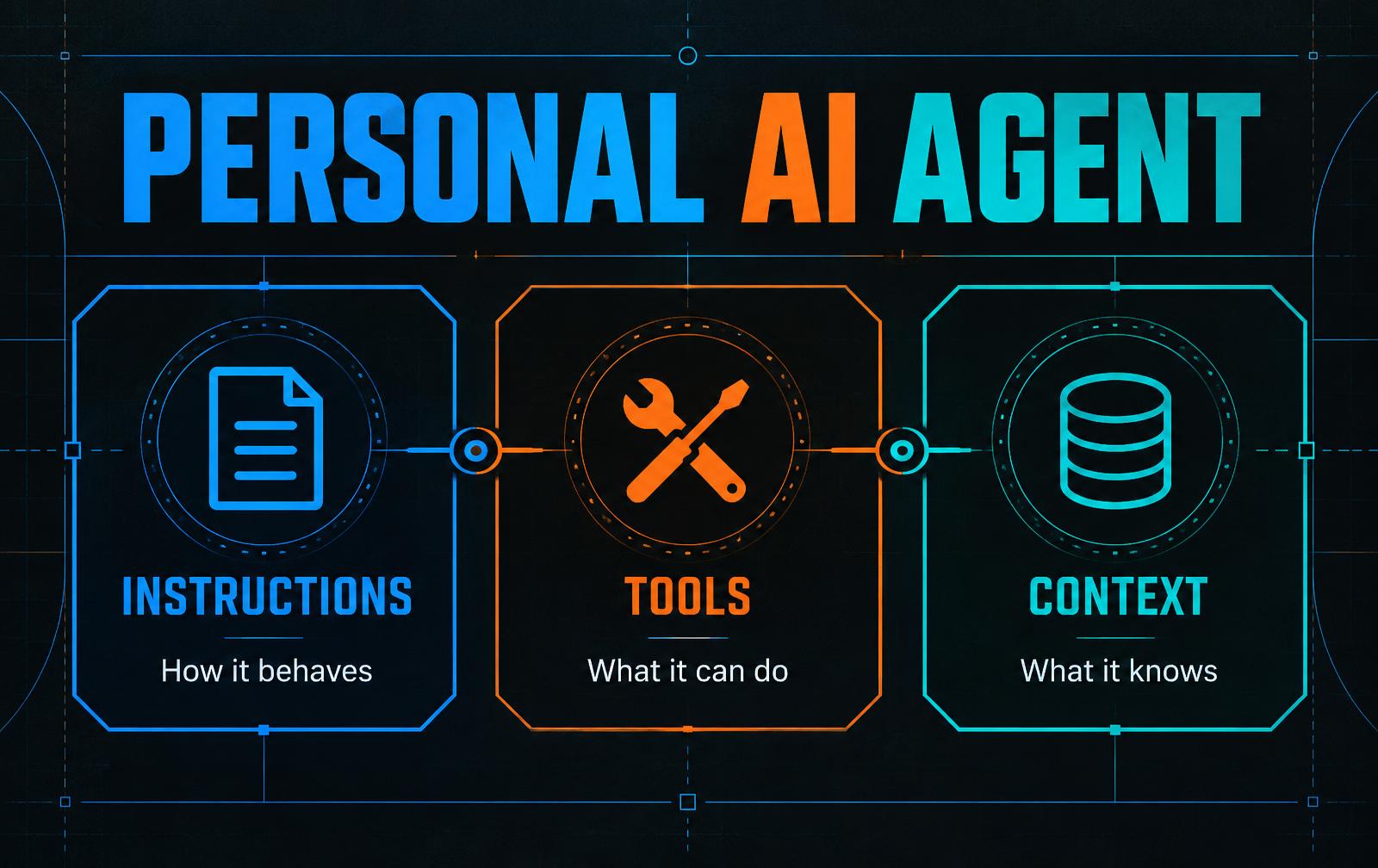
Instructions
Instructions are the standing orders the agent reads before it does anything. They are written in plain sentences, not code.
A dispatcher agent might be told: never quote a price, always confirm the service address before booking, and flag any job over $5,000 for the owner. That file is the difference between an assistant and a loose cannon.
Tools
Tools are the systems the agent is allowed to touch. Reading the shared inbox is a tool. Creating a calendar event is a tool. Writing a row into the job sheet is a tool.
An agent with no tools can only talk to you. An agent with tools can move work through your business, which is the entire reason to want one.
Context
Context is what the agent knows about your specific operation: your service area, pricing tiers, intake questions, and the fact that you do not run Saturday installs in winter.
Without context, the agent gives generic answers that sound fine and help nobody. It is the difference between a temp who read your handbook and a temp who did not. This three-part framing follows the version presented in Ben’s Bites session 2.
Does an AI agent learn my business over time?
No, not by default. It does not learn you the way a good hire does. Someone writes things down in a file or connected knowledge source, and the agent receives that information when it works.
This trips up almost everyone because talking to these systems feels like being remembered. In practice, durable knowledge must be saved intentionally. If it is not written back to an approved memory, the next session may not know it.
Treat that as a feature. A memory you can open is a memory you can fix. If the agent keeps booking jobs outside your service area, correct the radius in its context and test the next run. Inspectable beats clever when the system is touching your customers.
Which AI agent should I buy?
OpenClaw, Hermes Agent, Codex, Claude Code, GrokBot, Google Gemini, Microsoft Copilot, Instinct and similar products differ in convenience, available connections, setup work, and price. They still arrange the same basic parts: a model, instructions, tools, and context.
The more useful question is whether the process you want to hand over is worth automating. A process is a good candidate when it repeats, follows rules you could write down for a new hire, and consumes time that is worth more elsewhere. Quote follow-up qualifies. Sorting an inbox qualifies. Deciding whether to fire a customer does not.
If you cannot write the rules down, switching tools will not solve the problem. Writing the rules is step one for all of them.
Why do AI agent setups get abandoned?
Usually, nobody owns the upkeep. The build is an exciting project. Maintenance is a recurring chore with no deadline, so it loses to everything else on the list.
- Instructions are written once and never updated as services, territories, and prices change.
- The context file grows into pages of stale or contradictory notes, making answers worse instead of better.
- The person who built it moves on, and nobody else knows where the instructions and context live.
A maintenance cadence you can actually keep
Weekly, spend fifteen minutes reading what the agent produced. Find one thing it got wrong and correct the instruction or context that caused it. One correction a week compounds quickly.
Monthly, spend thirty minutes removing anything stale, superseded, or no longer true from the context. Treat this as pruning, not adding.
Quarterly, name the person who owns the system. If nobody can be named, you do not have an agent. You have an abandoned project with a login.
What should an AI agent be allowed to do without asking?
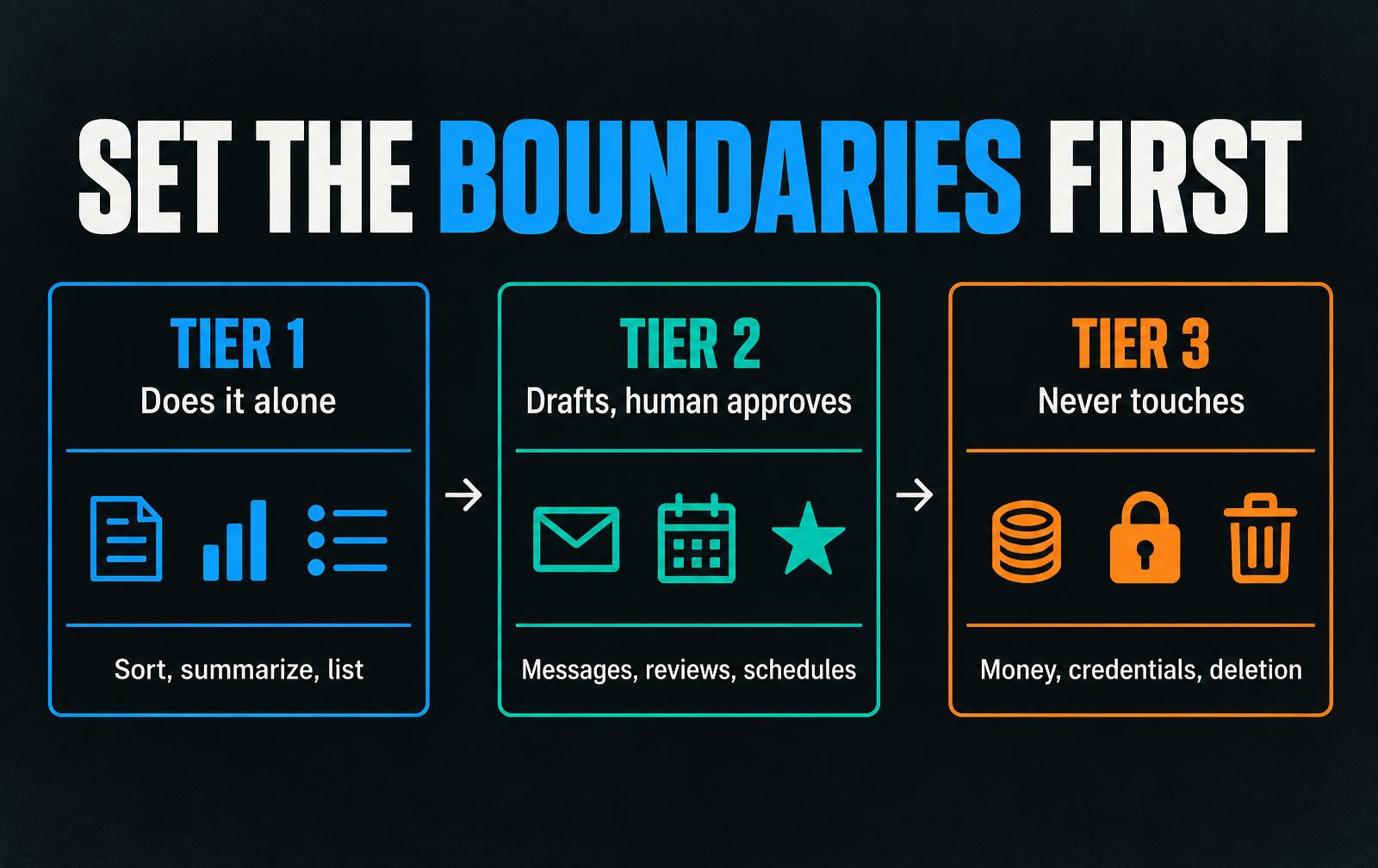
Sort every task into three tiers before connecting a single account. An agent holding your inbox, logins, or payment access creates risk, and the time to draw the boundary is before it has any of that.
- Tier one, does it alone: reversible, low-stakes work that no outsider sees, such as tagging email, summarizing completed jobs, or listing overdue invoices.
- Tier two, drafts it and a human sends it: anything a customer reads or anything that commits you, including quote follow-up, review replies, and rescheduling messages.
- Tier three, never touches: moving money, changing payment details, issuing refunds, signing agreements, deleting records, or handling credentials.
So where would I actually start?
Do not start with the tool. Start by finding which part of your operation is genuinely ready to hand over. Choosing the wrong process is how the first attempt fails.
A good first process repeats on a schedule, follows clear rules, has low-cost mistakes, and has one number you can measure. That could be response time, quotes followed up, or admin hours saved.
The free AI Readiness Diagnostic walks through your operation layer by layer and shows where the rules are clear enough to automate and where they still need to be written down. If the honest answer is not yet, it will tell you that too.
How much maintenance does a personal AI agent need?
Plan on fifteen minutes each week to review output and correct one instruction, thirty minutes each month to remove stale context, and a quarterly ownership check. The exact software cost depends on the systems it connects to and how often it runs.
The initial setup may fit into an afternoon for a narrow task. Reliable operation takes longer because the rules, permissions, edge cases, and review process have to be tested with real work.
Frequently asked questions
What is a personal AI agent in simple terms?
A personal AI agent is an AI model given three things: written instructions describing how it should behave, tools that let it act on real systems like your inbox or calendar, and context files holding facts about your business. Without tools it can only talk. Without context it gives generic answers.
Do I need to know how to code to set up an AI agent?
No. Instructions and context are written in plain sentences, the same way you would brief a new hire. Many current products connect to email or calendars through a setup screen. The skill that matters is writing your process down clearly, not programming.
How is an AI agent different from ChatGPT?
ChatGPT on its own primarily answers questions. An agent adds standing instructions, permission to use real tools, and maintained business context. The underlying model may be similar, but the systems around it change what it can do.
How long does an AI agent take to set up?
A narrow initial setup can take an afternoon. Reliable operation takes longer because the instructions, permissions, exceptions, and review process need testing. Plan for weekly review and monthly context cleanup after launch.
What should I never let an AI agent do?
Do not let it move money, change payment or bank details, issue refunds, sign agreements, delete records, or handle credentials. Keep customer-facing communication in a draft-and-approve tier until a person has reviewed enough output to trust the process.
Which AI agent tool is best for a service business?
Choose based on the process, integrations, permission controls, and upkeep your team can support. Product names change, but every useful agent still needs clear instructions, the right tools, accurate context, and a named owner.
Related questions
Want this built for you?
MODRN installs these systems for service businesses nationwide. Month to month, and you own everything we build.